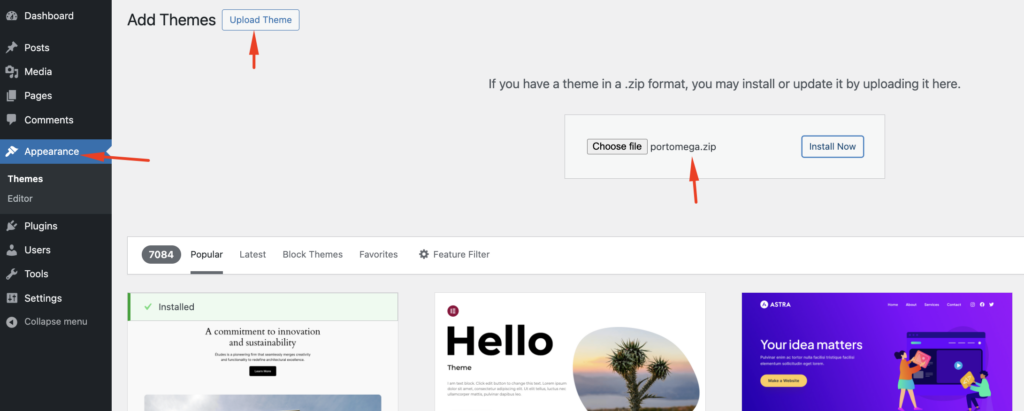

To install the Portomega theme, follow the steps below:
- Download the Theme
First, obtain the Portomega theme files. You can download the theme either from the author’s website or from a marketplace like ThemeForest (https://themeforest.net/). The theme will be provided as a.zipfile, which contains all the necessary files to install the theme. - Upload the Theme to WordPress
After downloading the.zipfile, you need to upload the theme to your WordPress installation. You can do this via the WordPress dashboard or using FTP.Via WordPress Dashboard:-
- Log in to your WordPress admin area.
- Navigate to Appearance > Themes.
- Click on Add New and then Upload Theme.
- Choose the
portomega.zipfile from your computer. - Click Install Now, and then Activate once the installation is complete.

Via FTP:-
- Unzip the
portomega.zipfile on your computer. - Use an FTP client (such as FileZilla) to connect to your server.
- Upload the unzipped
portomegafolder to the/wp-content/themes/directory of your WordPress installation. - Once uploaded, go to Appearance > Themes in your WordPress admin panel and activate the theme.
- Unzip the
-