Skip to content
Fox Themes Docs
Menu
Close
Themes
Docs
Help Center
Themes
Docs
Help Center
Pixxy
›
07. Theme Options
›
7.1.0 404 Page
7.1.0 404 Page
Brian Gathuita
Updated 2 years ago
07. Theme Options
Pixxy
1 min read
404 page
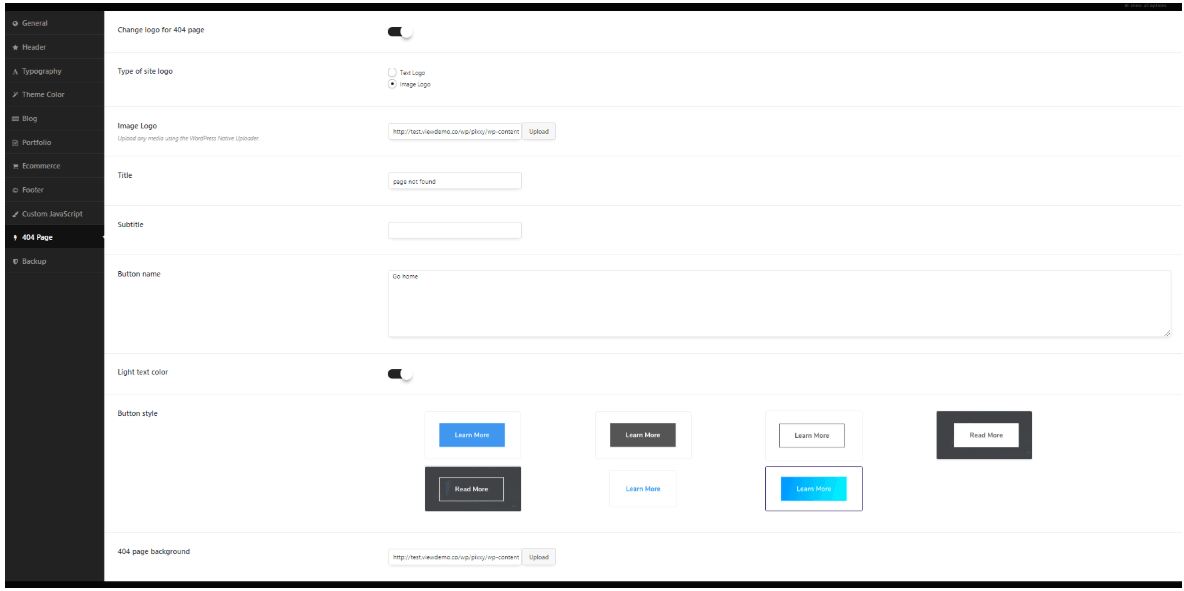
These options can be used to change the main text in 404 page:
– Change logo for 404 page – Click on to add the logo for this page.
– Type of site logo – You can select the type of the logo:
Image Logo – Image Logo
Text Logo – Text Logo
– Title – The error page title.
– Subtitle – The error page title.
– Button name – The text on the button, which usually redirects to the actual working page.
– Light text color – Here you can select the light text color.
– Button style – Chose the style of the button.
– 404-page background – Here you can upload the background image.
←
Previous
8.2.3 Services List shortcode
→
Next
8.2.4 Call To Action shortcode